
Blog
The ZLD Mass Balance Trap: How Auditors Calculate Effluent Using Your Water Bills | EHSSaral
EHSSaral is an Environmental Compliance Intelligence Platform for Industries. Consent Intelligence • Alerts & Tasks • Incident Reporting • Form IV & V • Audit-Ready Records
See how EHSSaral works
20 Aug 2026
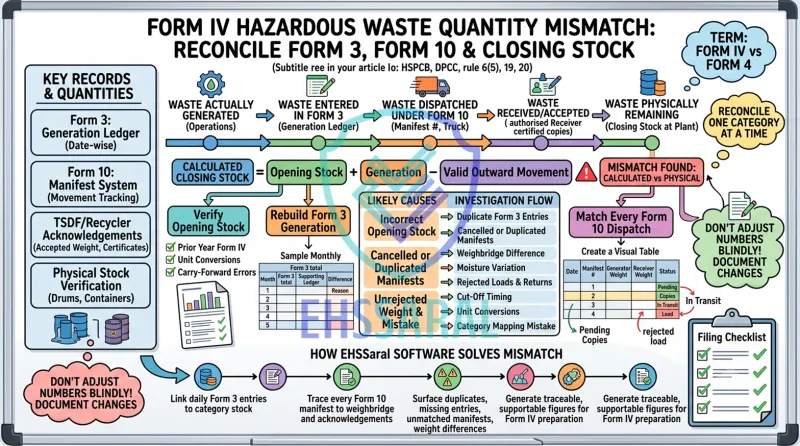
Preparing Form IV becomes difficult when the annual hazardous-waste figures refuse to agree.
Form 3 may show one quantity generated. Form 10 manifests may show another quantity dispatched. The TSDF or recycler may acknowledge a slightly different weight. Meanwhile, the physical stock remaining at the plant may not match the calculated closing balance.
This is where confusion usually starts.
The immediate reaction is often to adjust the annual total until the numbers appear to match. However, a balanced spreadsheet does not necessarily mean that the underlying records are correct.
Reconciliation does not mean forcing every record to show the same number. It means understanding what each record represents, locating the difference and documenting how the final quantity was determined.
This guide explains how an EHS professional can trace a Form IV hazardous-waste quantity mismatch systematically—without changing numbers blindly.
Terminology note: Many EHS professionals refer to the annual return as “Form IV.” In the Hazardous and Other Wastes Rules, 2016, the statutory format is titled “Form 4.” Both references in this article mean the same hazardous-waste annual return.
Quick answer: A Form IV hazardous-waste quantity mismatch should be investigated by reconciling five quantities separately: waste actually generated, quantity recorded in Form 3, quantity dispatched under Form 10, quantity received or accepted by the authorised receiver and physical closing stock. Complete this exercise separately for every authorised waste category before changing the annual-return figures.
For the overall filing structure, statutory fields and supporting records, refer to our practical guide to the Form 4 hazardous-waste annual return.
Under the Hazardous and Other Wastes (Management and Transboundary Movement) Rules, 2016, as amended from time to time:
For hazardous-waste generators, Part A of Form 4 captures category-wise waste generation, quantities dispatched for different forms of authorised management, any in-house utilisation and the quantity remaining in storage at the end of the year.
State portal fields and administrative workflows may differ. The reconciliation method below applies to the underlying records, but the filing and correction process should be checked on the applicable SPCB or PCC portal.
The Rule 6(5), Rule 19 and Rule 20 references are supported by the published Rules and official Form 3 format. 2016 Rules hosted by HSPCB and official Form 3 format hosted by DPCC.
| Where the mismatch appears | Records to check first |
|---|---|
| Current opening stock differs from previous closing stock | Previous Form IV, prior-year reconciliation and unit conversion |
| Form 3 generation appears high | Duplicate entries, stock treated as generation or incorrect category |
| Form 3 generation appears low | Missing dates, unrecorded batches or entries made only at dispatch |
| Form 10 total differs from the dispatch ledger | Missing, cancelled or duplicated manifests |
| Receiver quantity is lower | Weighbridge difference, moisture variation, packaging weight or partial rejection |
| Physical stock is lower than calculated stock | Unrecorded dispatch, duplicate generation or gross/net weight error |
| Physical stock is higher than calculated stock | Returned load, missing generation entry or incomplete dispatch |
| Portal quantity differs from internal records | Manual-entry error, incomplete portal transaction or reporting-period difference |
| One category exceeds its authorised quantity | Incorrect mapping, duplicate generation or an actual operational exceedance |
Use this table to identify where the investigation should begin. Do not make an adjustment until the relevant transaction trail has been checked.
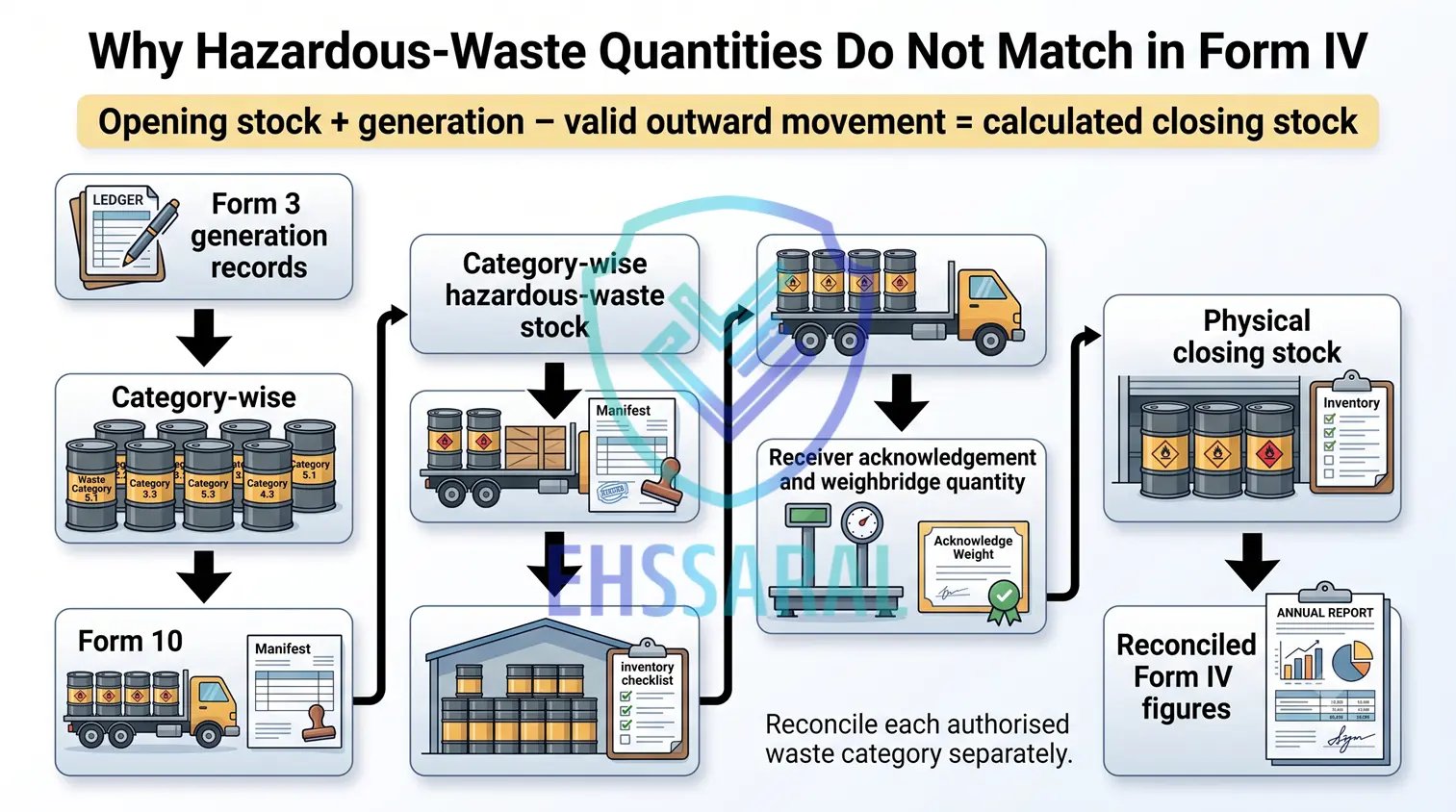
A reliable Form IV reconciliation separates five related but different quantities.
| Quantity | What it represents |
|---|---|
| Waste actually generated | The hazardous waste produced by the plant’s operations |
| Waste entered in Form 3 | The quantity recorded in the statutory operating record |
| Waste dispatched under Form 10 | The quantity sent from the plant under the manifest system |
| Waste received or accepted | The quantity certified or weighed by the TSDF, recycler or actual user |
| Waste physically remaining | The quantity actually stored at the plant at year-end |
These five figures may agree in a well-maintained system, but they do not automatically represent the same event.
For example, waste may be generated in February, recorded in Form 3 in March, dispatched on 30 March and acknowledged by the receiver on 1 April. Each document may be correct, but the year-end cut-off requires careful treatment.
The objective is to connect these five quantities category by category and consignment by consignment.
| Record | What it generally represents | Common source of confusion |
|---|---|---|
| Previous Form IV | Closing stock declared for the previous year | Quantity not carried forward correctly |
| Form 3 | Date-wise waste generated or received, stored and managed | Missing, duplicated or backdated entries |
| Form 10 | Movement of waste from sender to authorised receiver | Declared dispatch weight treated as final received weight |
| Generator weighbridge slip | Weight recorded at the dispatching site | Gross vehicle weight confused with net waste weight |
| Receiver weighbridge slip | Weight recorded at the receiving facility | Difference from generator’s weighing result |
| Receiver-certified Form 10 | Evidence that the consignment was received | Signed copy pending or linked to the wrong manifest |
| Disposal or recycling certificate | Further evidence of the waste’s treatment or receipt | Certificate period differs from dispatch period |
| Physical stock verification | Waste actually present at the plant | Estimated stock compared with weighed stock |
| SPCB portal record | Information entered or processed online | Portal status differs from physical records |
Form 3 itself records the type and category of waste, quantity in metric tonnes, method of storage and destination or source. Form 10 identifies the sender, transporter, receiver, waste description, quantity, containers and receiver certification. These records provide the underlying transaction trail for the annual return. Form 3 and Form 10 formats.
EHS teams can also review how Form 1 to Form 12 create a connected hazardous-waste compliance trail under the 2016 Rules.
For internal reconciliation, begin with:
Opening stock + waste generated = valid outward movement + in-house utilisation or other authorised management + closing stock
For a straightforward generator with no in-house utilisation:
Calculated closing stock = Opening stock + Generation − Valid outward movement
The equation works only when:
Part A of the statutory Form 4 for a hazardous-waste generator asks for year-end storage but does not provide a separate field for opening stock.
Opening stock is nevertheless essential for internal reconciliation. Ordinarily, the previous year’s verified closing stock becomes the current year’s opening balance.
Without this carry-forward, it is impossible to test whether the current year’s generation, dispatch and closing stock form a complete material balance.
| Particular | Quantity |
|---|---|
| Opening stock | 2.40 MT |
| Generated during the year | 18.60 MT |
| Total quantity available | 21.00 MT |
| Valid outward movement | 17.50 MT |
| Calculated closing stock | 3.50 MT |
| Physical closing stock | 3.50 MT |
| Difference | Nil |
A clean calculation is useful, but most filing problems arise when the final two rows do not agree.
Consider the same plant, but physical verification shows only 2.90 MT at year-end.
| Particular | Quantity |
|---|---|
| Opening stock | 2.40 MT |
| Form 3 generation total | 18.60 MT |
| Dispatch summary | 17.50 MT |
| Calculated closing stock | 3.50 MT |
| Physical closing stock | 2.90 MT |
| Unexplained difference | 0.60 MT |
The EHS team should not reduce the closing stock by 0.60 MT merely to complete Form IV. It should trace the difference.
| Investigation | Finding | Effect on calculated stock |
|---|---|---|
| Previous closing stock checked | Opening balance was correct | Nil |
| Monthly Form 3 totals checked | One 0.25 MT generation entry was duplicated | Reduce by 0.25 MT |
| Form 10 register checked | A 0.20 MT dispatch was supported by documents but omitted from the annual summary | Reduce by 0.20 MT |
| Container weighing method checked | Aggregate empty-drum tare of 0.15 MT had been included in generation | Reduce by 0.15 MT |
| Total difference explained | 0.60 MT |
| Particular | Original | Correction | Reconciled |
|---|---|---|---|
| Opening stock | 2.40 MT | Nil | 2.40 MT |
| Generation | 18.60 MT | −0.40 MT | 18.20 MT |
| Outward movement | 17.50 MT | +0.20 MT | 17.70 MT |
| Calculated closing stock | 3.50 MT | −0.60 MT | 2.90 MT |
| Physical closing stock | 2.90 MT | Nil | 2.90 MT |
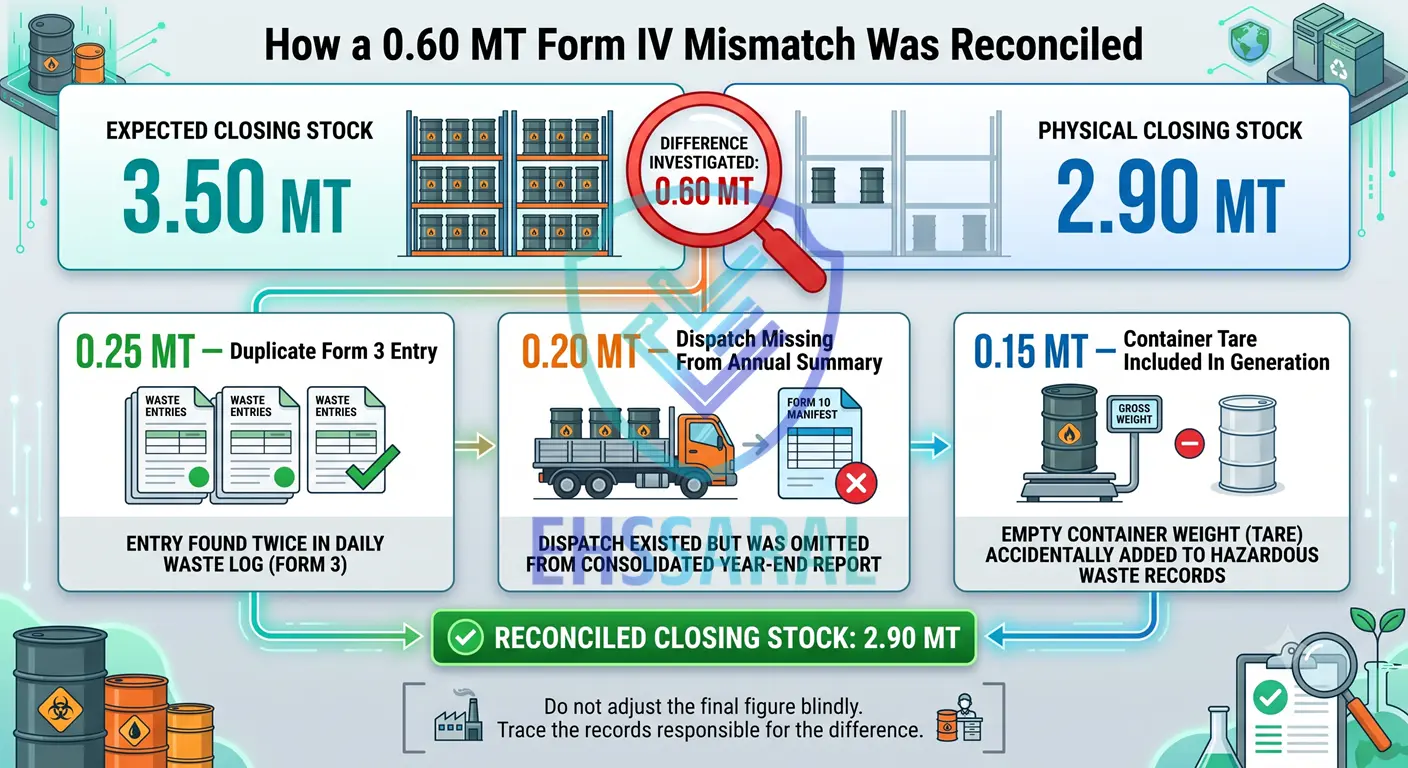
The final balance now agrees, but more importantly, every change has a traceable reason.
Practical software connection: In this example, explaining the 0.60 MT difference required the team to compare Form 3 entries, dispatch records and weighing calculations manually. EHSSaral’s hazardous-waste reconciliation module is ready for controlled pilot implementation and can help surface duplicate, missing or unmatched records before they accumulate into a Form IV reconciliation problem. Operational reasons such as container tare or moisture variation will still require review by the plant team.
The corrections should retain:
This is what turns a mathematical adjustment into a supportable reconciliation.
Do not begin by combining all hazardous waste generated at the plant.
A total excess in one category can hide a shortage in another. It can also conceal an incorrect category mapping or create a misleading comparison with the hazardous-waste authorisation.
Prepare a separate reconciliation for every authorised waste category.
| Field | Purpose |
|---|---|
| Authorised waste category | Connects the record to the plant’s authorisation |
| Internal waste description | Identifies the name used by production or stores |
| Opening stock | Carries forward the previous closing balance |
| Monthly generation | Helps locate when the difference began |
| Annual generation | Provides the Form IV generation basis |
| Form 10 dispatch quantity | Records outward movement declared by the generator |
| Receiver quantity | Verifies receipt and highlights weight differences |
| Returned or rejected quantity | Restores waste to stock where applicable |
| Calculated closing stock | Derives the expected balance |
| Physical closing stock | Records the verified quantity at site |
| Difference | Identifies the quantity requiring investigation |
| Explanation | Records the reason |
| Supporting evidence | Links the conclusion to documents |
Only after every category has been reconciled should the quantities be consolidated for review and filing.
Compare the internal opening balance with the previous year’s Form IV closing stock.
Investigate differences caused by:
If the opening stock is incorrect, even accurate current-year records will not reconcile.
Where a prior-year issue is discovered, preserve it as a separate reconciliation point. Do not quietly replace the opening balance without documenting why it differs from the filed return.
An annual total can hide where a difference began. Recalculate Form 3 month by month and category by category.
Check for:
A simple monthly comparison is often enough to identify when the mismatch first appeared.
| Month | Form 3 total | Supporting ledger | Difference | Reason |
|---|---|---|---|---|
| April | 1.40 MT | 1.40 MT | Nil | — |
| May | 1.75 MT | 1.50 MT | 0.25 MT | Duplicate Form 3 entry |
| June | 1.30 MT | 1.30 MT | Nil | — |
Once the affected month is known, the team can inspect a smaller group of source records instead of reviewing the full year repeatedly.
After reconciling generation, compare the category-wise annual quantity with the plant’s hazardous-waste authorisation.
A duplicate or wrongly classified entry can make it appear that the authorised quantity was exceeded. An actual process change may also have increased generation.
Treat these as two separate questions:
Do not reduce, split or reclassify a quantity merely to keep it within the authorisation limit. If the reconciled records indicate an exceedance or an unlisted waste stream, review the operational cause and the applicable compliance action separately.
Create one row for every consignment.
| Dispatch date | Manifest number | Waste category | Form 10 quantity | Generator weight | Receiver weight | Status |
|---|---|---|---|---|---|---|
| 12 June | HW/024 | 35.3 | 4.20 MT | 4.20 MT | 4.16 MT | Received |
| 18 September | HW/051 | 35.3 | 3.80 MT | 3.80 MT | 3.80 MT | Received |
| 30 March | HW/089 | 35.3 | 2.50 MT | 2.50 MT | Pending at year-end | In transit |
Match each manifest with the available supporting records:
Rule 19 prescribes a seven-copy Form 10 manifest system and provides for the receiver to certify acceptance and return the relevant copy to the sender. A pending receiver copy should therefore remain visible in the reconciliation instead of being assumed complete. Rule 19 manifest requirements
Three weights may exist for one consignment:
The printed Form 4 field for a generator refers to “quantity dispatched.” The receiver’s certified quantity remains important evidence that the waste reached the authorised destination, but it should not automatically replace the dispatch quantity without investigation.
When the two weights differ, check:
The final treatment should be documented. Avoid using whichever quantity makes the annual balance easier to close.
| Record | Quantity |
|---|---|
| Form 10 quantity | 5.20 MT |
| Generator net weighbridge quantity | 5.18 MT |
| Receiver net weighbridge quantity | 5.06 MT |
| Difference requiring review | 0.12 MT |
The 0.12 MT should not automatically be labelled “moisture loss.” The team should first verify the weighing method, tare, packaging, material condition and any receiver remarks.
Year-end transactions often create genuine timing differences.
Consider a consignment that:
The plant should examine:
The objective is to apply a consistent cut-off method supported by records—not to move the transaction between years merely to balance Form IV.
A consignment may be:
If waste returns to the generator, it may need to be restored to the site stock record. Otherwise, the documents may show a dispatch even though the waste is physically present at the plant.
Retain the return gate entry, weighbridge record, receiver communication and revised movement documents as applicable.
Hazardous-waste records commonly contain a mixture of:
Form 3 specifies quantity in metric tonnes, while Form 10 provides for quantity in cubic metres or metric tonnes. This makes conversion control important.
| Conversion | Check |
|---|---|
| Kilograms to metric tonnes | Divide kilograms by 1,000 |
| Litres to kilograms | Use a documented, material-specific density |
| Drums to weight | Use actual net weight or a documented representative basis |
| Gross to net weight | Deduct vehicle, container or packaging tare correctly |
| Wet sludge to dry solids | Do not mix the two bases without explanation |
| Monthly values | Confirm every sheet uses the same unit |
| Decimal values | Check for misplaced decimal points and rounding |
A volume-to-weight conversion should have a documented basis. Avoid introducing a convenient assumed density only to close the difference.
ETP sludge, paint sludge and similar wastes may change weight during storage.
Possible causes include:
These are legitimate areas to investigate, but “moisture loss” should not become a general balancing entry.
For a material difference, record:
Calculated stock should be compared with waste physically present at the plant.
A practical verification should include:
A physical stock count conducted several days or weeks after 31 March does not automatically represent the year-end balance.
If verification takes place later, reconstruct the 31 March position:
Observed stock on the verification date − generation after 31 March + dispatch after 31 March ± documented returns or corrections = reconstructed closing stock as at 31 March
Use only transactions occurring between 31 March and the verification date.
The same waste may appear under different descriptions in different departments.
For example:
| Source | Description used |
|---|---|
| Hazardous-waste authorisation | ETP sludge |
| Production or utility record | Filter press cake |
| Stores register | Wet sludge drums |
| Form 10 | Treatment residue |
| TSDF acknowledgement | Internal facility waste code |
Before totals are consolidated, map every internal description to the applicable authorised category.
Watch for:
A surplus in one category should not be used to offset a shortage in another.
In states where hazardous-waste movements or annual returns are processed through an online system, check the portal record independently from the physical documentation.
Possible situations include:
Portal terminology and workflows vary among SPCBs. Therefore, first establish the correct documentary and physical position, and then determine the appropriate portal correction process.
Do not change the internal evidence trail simply to reproduce an incorrect portal entry.
Where the documentary figures are correct but online filing remains incomplete, use this guide to review common hazardous-waste Form 4 portal errors separately.
Follow this sequence for each waste category:
Corrections may include:
Maintain a correction trail containing:
| Field | What to record |
|---|---|
| Original entry | What was recorded initially |
| Corrected entry | Revised value or classification |
| Reason | Why the correction was needed |
| Evidence | Form 10, weighbridge slip, register or acknowledgement |
| Correction date | When the record was changed |
| Prepared by | Person completing the reconciliation |
| Reviewed by | Internal reviewer or approver |
| Impact | Effect on generation, dispatch or closing stock |
Avoid overwriting the original workbook or register without retaining an explanation. A clean-looking final sheet with no correction history may be more difficult to defend than a transparent record showing how the issue was found and resolved.
If an error is identified after filing:
Do not silently use the corrected value as the next year’s opening stock while leaving the difference unexplained. This merely transfers the problem into the next annual return.
Before finalising Form IV, confirm that:
Excel can calculate whether a hazardous-waste mass balance agrees. When it does not agree, however, the EHS team usually has to trace Form 3 entries, manifests, weighbridge slips, receiver acknowledgements and physical stock records manually.
In the worked example above, the 0.60 MT difference came from three separate issues:
EHSSaral’s hazardous-waste reconciliation module is ready for controlled pilot implementation at Indian manufacturing sites. It connects:
When a mismatch occurs, the module can surface the records most likely to require review—for example, a duplicate generation entry, an unmatched manifest, a missing acknowledgement or a difference between generator and receiver quantities.
Some findings will still require professional judgement. The system may identify a 0.15 MT difference, but the plant team may need to confirm whether it resulted from container tare, moisture variation, an incorrect unit, partial acceptance or another operational reason.
EHSSaral does not assume direct integration with SPCB portals because published open APIs are generally not available for these hazardous-waste filing workflows. After internal review, the reconciled quantities may still need to be copied and entered into the applicable portal.
The purpose is to prepare traceable, internally reviewed and Form IV-ready figures before filing—not merely to automate portal data entry.
If Form 3, Form 10, receiver acknowledgements and physical stock do not agree, begin with a category-wise transaction trail—not an adjustment to the final total.
A supportable Form IV is not one in which the numbers have simply been made equal. It is one in which generation, movement and closing stock can each be traced back to clear records.
See how EHSSaral helps trace hazardous-waste mismatches category by category—from Form 3 and Form 10 to closing stock and Form IV readiness. Request a controlled pilot walkthrough.
Common causes include missing or duplicate Form 3 entries, incorrect unit conversion, category-mapping errors, transactions posted in the wrong financial year or closing stock included as generation. Recalculate Form 3 month by month before adjusting Form IV.
Not automatically. Form IV includes generation, dispatch and year-end storage, while Form 10 relates to individual movements. Opening stock and closing stock can cause annual generation and annual dispatch totals to differ legitimately.
The generator section of Form 4 refers to quantity dispatched. The receiver’s weight is important verification evidence, but a difference should first be investigated. The chosen basis should be documented and applied consistently instead of selecting whichever figure closes the balance.
Link the acknowledgement to the original dispatch and apply a consistent year-end cut-off based on the movement evidence. Ensure that the consignment is not counted in both years or omitted from both.
Moisture variation may explain part of a difference, but it should have a reasonable and documented basis. It should not be used as a general balancing adjustment without checking weighment, storage conditions, drainage and packaging.
For a basic generator:
Opening stock + generation − valid outward movement − authorised in-house utilisation = calculated closing stock
Compare the result with physically verified stock for the same category and reporting date.
Check opening stock, Form 3 duplication, missing dispatches, returned loads, unit conversion, gross/net weight and category mapping. Reconstruct the year-end physical position if the count was conducted after 31 March.
Prepare a documented reconciliation, quantify the impact and check the correction or revision process of the applicable SPCB. Preserve the original filing and ensure the issue is not carried unexplained into the next reporting year.

Founder, EHSSaral
Founder - EHSSaral | Partner - Perfect Pollucon | ISO 14001 Lead Auditor | GHG Protocol Scope 2 | Chemist | Data Scientist | Second-generation environmental professional simplifying EHS compliance for Indian industries through practical, automated, tech-enabled, data driven compliance workflows.
The ZLD Mass Balance Trap: How Auditors Calculate Effluent Using Your Water Bills | EHSSaral
Form V Environmental Statement: Due Date, Format, Example & Guide
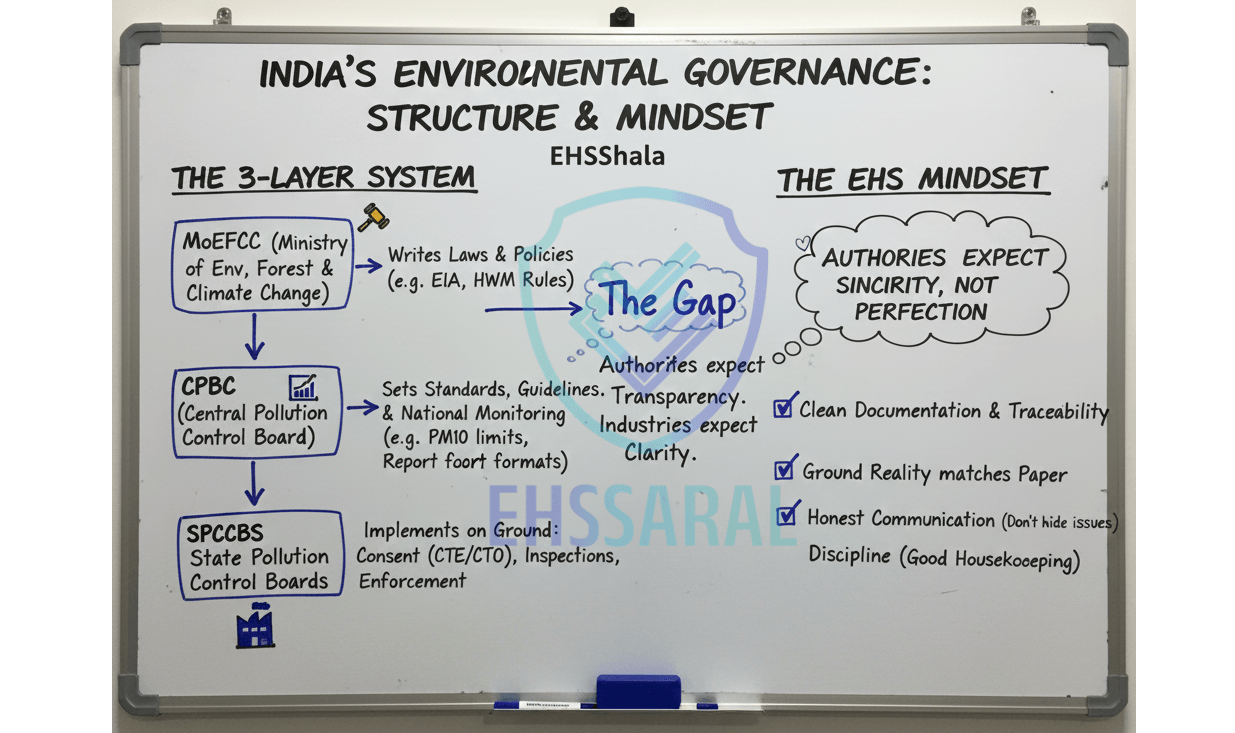
How MoEFCC, CPCB & SPCB Work in India: Expert Guide | EHSShala
Sampling Basics for Air, Water & Noise EHS Officer Guide | EHSShala
Post-Grant Environmental Compliance Failures in India | EHSSaral Research

How to Read Your Consent Copy (CTE & CTO Explained Simply) | EHSShala
 Guide for Indian Factories EHSShala by EHSSaral.webp)
Ambient Air Quality Monitoring (AAQM) Guide for Indian Factories | EHSShala
Environmental Compliance in India: Beginner Roadmap | EHSShala
Evolution of EHS in India - (Part 2) Post-Bhopal | EHSShala

Environmental Compliance Calendar Software – Simplify MPCB Renewals & Due Dates | EHSSaral